Last updated: 2026-11-10
Generating the database schema in a Spring Boot application
Create your customized Spring Boot prototype with database schema, Thymeleaf, jte, Angular or React frontend and much more - best practices included. ♥
Discover more
Hibernate, Liquibase and Flyway offer different ways to create and evolve a Spring Boot database schema. We compare them using a small voucher table, from the first local run to changes deployed across environments.
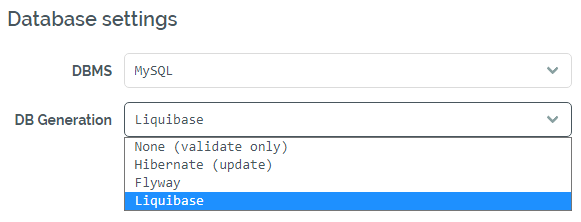
Database generation options in Bootify
Hibernate
With the property spring.jpa.hibernate.ddl-auto you can set how Hibernate handles automatic schema generation. The possible options are described in detail in the Hibernate documentation.
If the option is set to validate, Hibernate checks that the existing schema matches the entity mappings. That's a useful option if the database is managed externally, but you still want to make sure that the schema is matching your expectations. According to the fail-fast principle, the application will stop during startup if the validation fails. Keep in mind that some mismatches can only be detected during runtime.
Java entity class example
If ddl-auto is set to update, Hibernate will automatically generate the schema according to the provided Java entities. That's the advantage here: no further scripts are necessary, because the Java entities already describe the database schema. For development or testing purposes this is a good option, but Hibernate doesn't recommend its usage in production - changes of the entities cannot be managed reliably by Hibernate. Instead, a schema migration tool should be used for applications going to production.
Liquibase
Liquibase is a tool for describing and executing schema changes. Changes are grouped into changesets inside changelog files and applied during application startup. Liquibase records completed changesets in DATABASECHANGELOG, so ordinary changesets run once. Options such as runOnChange explicitly allow a changeset to run again.
Example of a Liquibase changelog
This makes Liquibase very suitable for applications with multiple environments (production, other developers, etc.). Changes to the schema (e.g. adding a table) are described by the developer in a changelog and added to the code base. This way the change is automatically executed everywhere.
In the default configuration provided by Bootify, all files in src/main/resources/changelogs will be executed. It's recommended to use the current timestamp as a file name, so these files are executed in the right order. The ddl-auto option of Hibernate could be set to validate in this case to check for mismatches.
Flyway
Spring Boot supports Flyway as well as Liquibase for schema migrations. Flyway works on a similar principle. You can add SQL scripts to the source code, which are executed automatically once at application startup. The scripts run directly against the database, i.e. they are written in the respective dialect (e.g. MySQL).
Example MySQL script for a Flyway migration
This allows developers to work directly with database-specific functions. Versioned scripts use names such as V1__create_voucher.sql, with two underscores before the description. Repeatable scripts use names such as R__update_voucher_view.sql: they run initially and again when their checksum changes, after pending versioned migrations. They do not run on every startup when unchanged. See the Flyway repeatable migration documentation.
Bootify places the generated SQL migrations for our custom schema in src/main/resources/db/migration. Once a versioned migration has been applied to a shared environment, we add a new migration for further changes instead of editing its history.
Conclusion
For our voucher application, Hibernate can create an initial development schema, while Liquibase or Flyway records the changes we deploy. Choose one tool to manage schema changes and optionally use Hibernate with ddl-auto=validate to check the result at startup.
Further readings
Database initialization with Spring Boot
Hibernate best practices on schema generation