Last updated: 2026-09-26
Adjust existing features of the Bootify Builder
In the Builder Config tab, the Free and Professional features are managed.
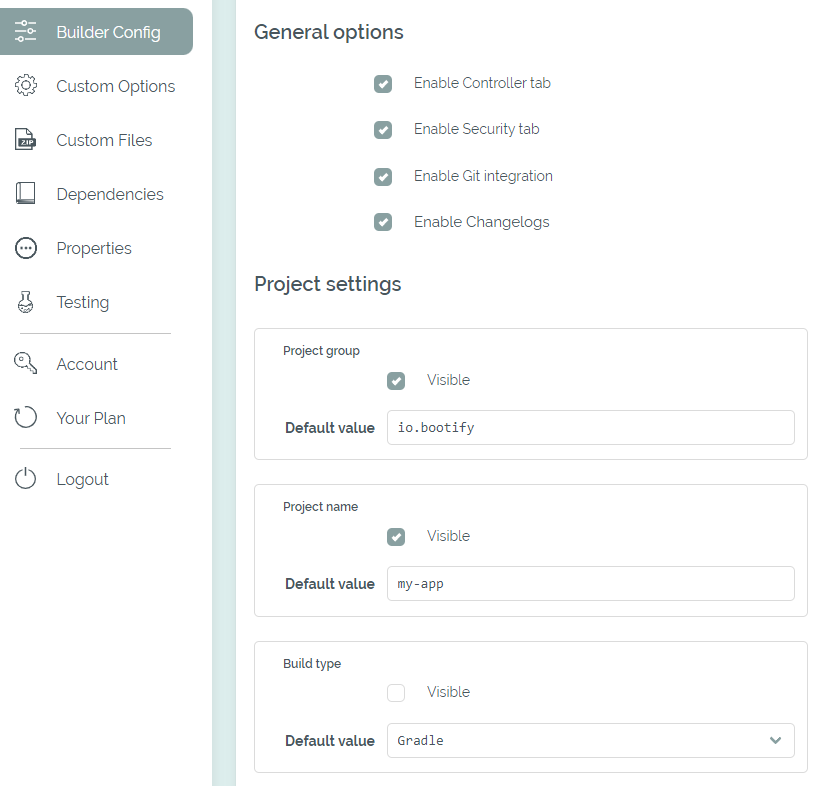
Configuration of dependencies and regular options
In the following areas the regular options of the Builder can be managed. The available values can be reduced and the default value for new projects can be defined. If there is a company-wide rule for an option (e.g. Gradle only) and deviations are not desired, an option can be hidden completely.
Changes here will have no effect on the settings of existing projects. As long as a project has a deviating value, the respective option is still visible for this project.
Reference project
Each template has a hidden reference project, linked at the top of this tab. It is not listed with your projects and is deleted together with the template. Besides being the base of the Testing Setup, it defines which objects are copied to all projects of the template.
In the reference project, entities, relations, indexes, enums and data objects have the additional field SpEL for inclusion. It takes a SpEL condition like project.customOptions['multiTenant'] == 'true' - see Custom Options - that is evaluated against each project and validated right away. Objects with a condition have to be in the base module. Objects without a condition are only part of the test exports. With the MCP server for projects, the reference project shows and accepts the templateCondition of its objects.
In the projects, the copied objects keep their identity and are marked as provided by the template, without showing the condition: they cannot be changed, moved to another module or deleted, but entities and data objects can get additional fields and enums additional values, and the fields can be reordered. Every change to the reference project is applied immediately to all projects of the template. If a condition is no longer met, for example after an option was changed, the objects are removed again including additional fields of the users. If a custom option is renamed or removed, conditions that still reference it must be adjusted first. An invalid condition or an error applying the change to any project rejects the entire change, leaving the reference project and all derived projects unchanged.
If the name of an object or field of a project collides with the template, the object of the project is renamed with the suffix Custom. Objects that would break a project are adjusted or omitted: a relation to an entity that is not copied is omitted, and a field using an enum or data object that is not copied becomes a String.