Last updated: 2026-09-26
Add and manage custom options
In this area you can add and manage your own options. Possible types are Checkbox, Select, Radio, String and Text. They appear at one of the selectable positions of the General tab in the Bootify Builder. A description can be added to explain the result of the option to the developer.
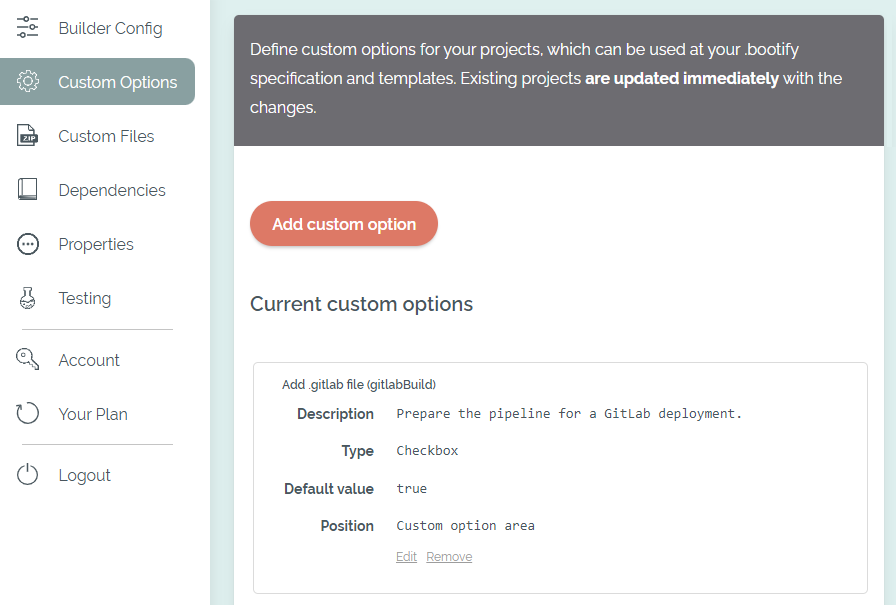
Manage custom options
The values of custom options can be referenced in different places. To better understand the JSON structure of a project, it can be viewed using this link. For example, a custom option could be accessed in your .bootify file using the expression project.customOptions['gitlabBuild']. All values are returned as a string there (for example 'true').
When custom options are added, modified or deleted, all existing projects are updated as well and the corresponding option is also added, modified or deleted. Before saving, Bootify checks the proposed configuration against the template defaults, the reference project and all existing projects. This includes object inclusion conditions, application property expressions, .bootify rules and FreeMarker templates in the active file archive, including build extensions. If a check fails, the entire change is rejected and all projects keep their previous state.
Adjust dependent expressions and files before renaming or removing an option. Uploaded archive versions that are no longer active are not checked. These checks cover the current project states and defaults; use the Testing Setup to verify other option combinations.